Advanced
An ordinary result does not need this tab. Open it to replace the fill light the material type chose, or to see what the tool read and what it will write.
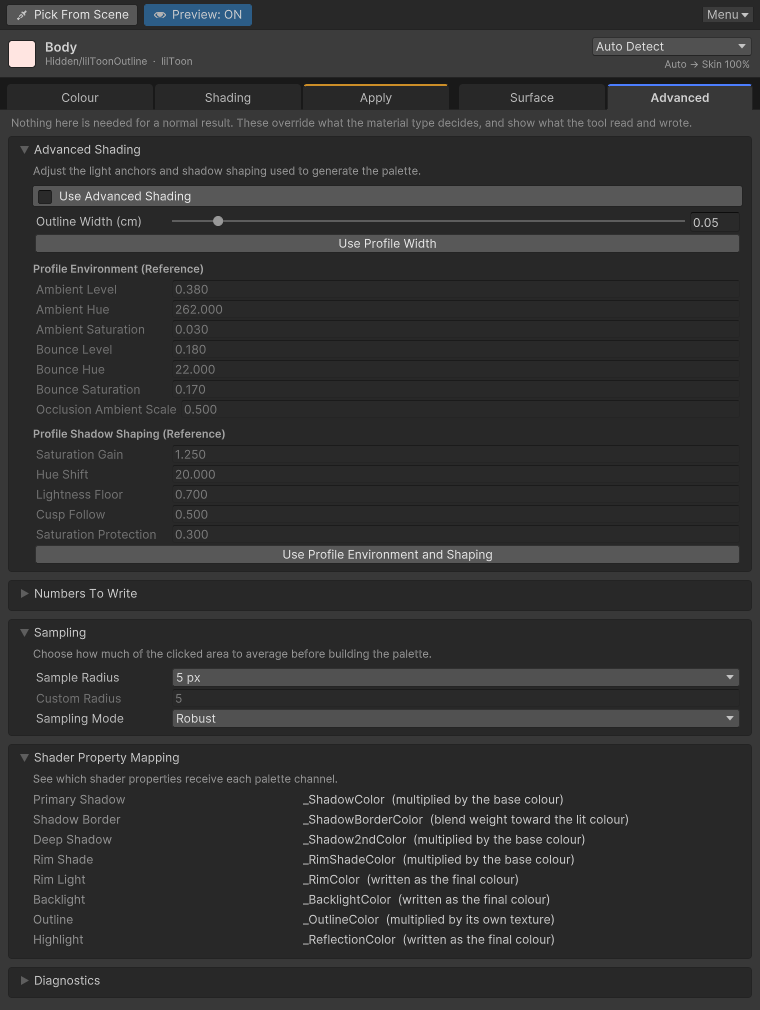
Set the fill light yourself
Turn on Use Advanced Shading to use the values below instead of the material type's lights. Use Profile Environment and Shaping copies the detected type's values into fields you can edit. Click it when you want to start from that type and then change it.
| Control | What it does |
|---|---|
| Ambient Level | How much cool ambient light remains in the shadow |
| Ambient Hue | The hue of that ambient light |
| Ambient Saturation | The saturation of that ambient light |
| Bounce Level | How much warm bounce remains in the shadow |
| Bounce Hue | The hue of that bounce light |
| Bounce Saturation | The saturation of that bounce light |
| Occlusion Ambient Scale | How much ambient light survives in the deep shadow |
Shadow Shaping
Shadow Shaping changes how the shadow colour and the shadow border move.
| Control | What it does |
|---|---|
| Saturation Gain | How much a pale shadow keeps or gains colour |
| Hue Shift | How far the shadow hue moves toward its anchor |
| Lightness Floor | The lowest share of base lightness a shadow may keep. Raise it when a dark material crushes to black. |
| Cusp Follow | How closely saturation follows what that lightness can display |
| Saturation Protection | How hard a vivid colour resists the hue shift |
When the shading style is Custom, Custom Terminator Shape is where you type Shadow Border, Shadow Blur, Deep Shadow Border, Deep Shadow Blur, and Border Colour Range.
Reset to Profile Defaults puts the lights, the shadow shape, and the custom shape back to that material type's defaults.
To reuse what you set here on another material, save a preset from Toolbar and menu.
How a click is read
Sample Radius is the size of the area averaged around the click. Raise it when the texture is noisy.
Sampling Mode is how the pixels in that area are combined.
| Mode | Behaviour |
|---|---|
| Center | The clicked pixel only. |
| Average | The mean of every pixel in the area. |
| Median | A colour near the middle. |
| Robust | Outliers are dropped, then the rest are combined. This is the default. |
Radius and mode are stored for you, not in the project settings.
Which property actually receives the colour
Expand Shader Property Mapping to see which shader property each palette channel writes. Supported rows show the channel, the destination, and the meaning. Missing ones say Not available in this material. The table does not change any value.
Numbers written alongside the colour, such as strength, border, blur, and outline width, are listed here too.
Diagnostics
Diagnostics is the raw record of the last pick: renderer, material, shader, UV0, texture UV, triangle, submesh, material slot, and sample count. When an apply does nothing, read this next to Troubleshooting.