Shape Key Transfer
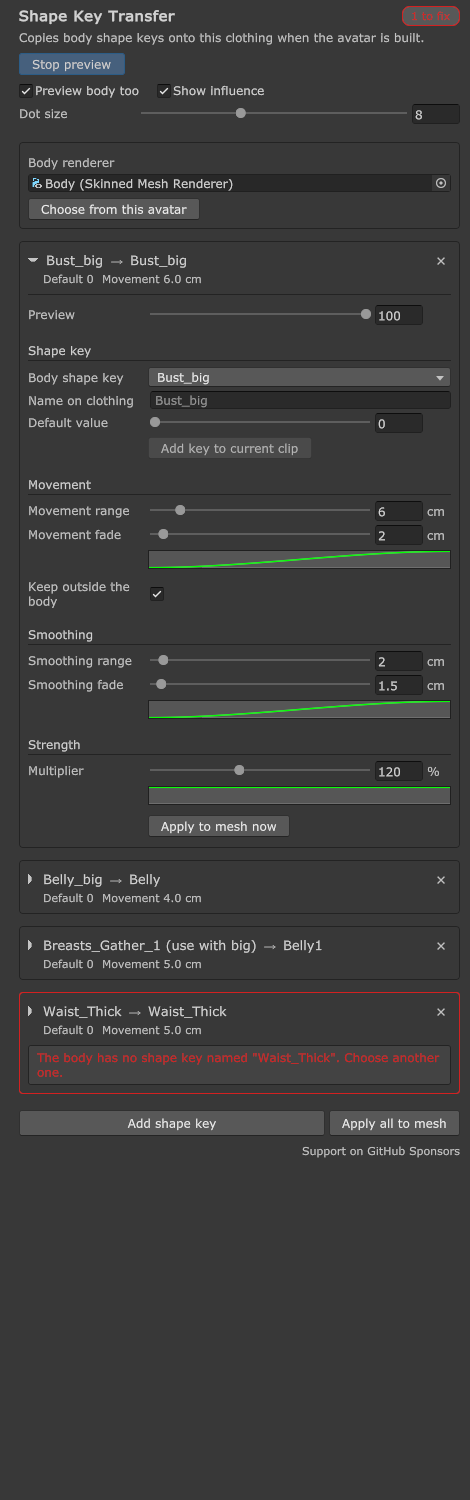
Transfers a shape key from the body (for example breast size or belly) onto the clothing as a shape key of its own. The clothing follows the body as if it had that shape key from the start. NDMF creates the shape keys when the avatar is built, and the original mesh files are not changed.
Features
| Feature | Description |
|---|---|
| Transfer shape keys | Pick a body shape key and the clothing gets a shape key with the same name, or a name you choose. |
| Movement range | Set how far from the moving part of the body the clothing still follows with Movement range, and fade the movement out at the edge. |
| Smoothing | Averages the body movement around each clothing vertex, so clothing sparser than the body follows smoothly instead of forming sharp points. |
| Strength | Set with the Strength by distance curve how strongly the clothing follows, depending on distance, and scale it all with Multiplier. |
| Preview | See the result in the Scene view with the Preview slider (0–100). Preview body too can move the body along with it. |
| Animation | Animations made against the component move the new shape key on the clothing after the build. |
Scale
The result is correct whatever the scale of the avatar, the clothing or the bones. It follows the same way if you enlarge the avatar by 1.1, stretch the clothing differently on each axis (for example 1.1, 1.2, 1.1), use negative scale, or use a different bone structure on the body and the clothing.
Requirements
- Unity 2022.3 LTS
- NDMF 1.14 or later (already included in projects that use Modular Avatar)
- VRChat Avatars SDK
Support
If Shape Key Transfer helps you, please consider supporting it on GitHub Sponsors. Your support keeps vrc-booth.com running and funds upcoming VRChat open-source projects such as hr-osc.