Troubleshooting
Inspector messages
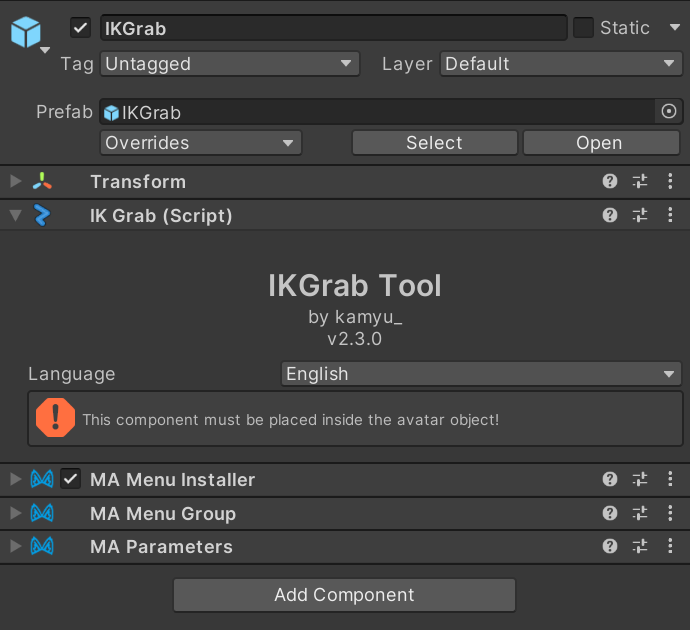
This component must be placed inside the avatar object!
The inspector shows this error when the component is not under an object that has a VRC Avatar Descriptor. Move it under the avatar root.
This avatar does not have an Animator component!
The avatar root object has no Animator. The presets also read the humanoid rig of this Animator to find the bones.
This avatar is not Humanoid, so only Custom is available.
When the avatar root's Animator is not Humanoid, you cannot use the presets. Put the bones in Upper Bone, Lower Bone and End Bone (Optional) yourself.
Build errors
Problems found during the build appear in the NDMF error window. Each error starts with the name of the IKGrab component, and you can click the objects in it to select them. Any error makes upload and Build & Test fail. In Play mode only the component with the problem is left out, and the others still work.
Upper Bone and Lower Bone must both be set.
Set both Upper Bone and Lower Bone. End Bone (Optional) may stay empty.
Bone '…' was not found in the avatar.
The stored bone path is not in the avatar. If you renamed the bone, pick it again. This error also appears when Modular Avatar Bone Proxy or Merge Armature moves the bone during the build. Use the avatar's own bones for IKGrab.
Bone '…' is already used by another IKGrab component.
Only one IKGrab component can use a bone. Pick bones that do not overlap, or remove one of the components.
Bone '…' is set more than once in this component.
Set different bones in Upper Bone, Lower Bone and End Bone (Optional).
End bone name '…' clashes with another IKGrab component's end bone.
The PhysBone parameter and the animation clip names come from the end bone name, so it must differ between components. The comparison ignores case and characters that are invalid in file names. When End Bone (Optional) is empty, Lower Bone is the end bone.
Bone '…' conflicts with a VRC Parent Constraint or Parent Constraint on '…'.
IKGrab adds its own VRC Parent Constraint to the bone. It cannot do that when the bone already has a parent constraint, or when another object's VRC Parent Constraint uses the bone as its Target Transform. Remove the constraint on the object named in the error, or pick another bone. Constraints on objects removed from the build by EditorOnly or Modular Avatar Platform Filter do not count.
The avatar's FX layer has no FX controller, or it is not an Animator Controller.
Assign an Animator Controller to the FX layer of the VRC Avatar Descriptor. IKGrab needs an FX controller.
FX parameter '…' has type ….
The FX controller already has a parameter with a name IKGrab uses, and it is not Bool. Rename that parameter, or change Toggle Parameter Prefix.
PhysBone parameter '…' is already used by the PhysBone on '…'.
IKGrab's PhysBone parameter is <end bone>_IK. Change the parameter of the PhysBone named in the error.
… use the same parameter '…' after optimization.
A PhysBone that Avatar Optimizer created after IKGrab, for example with Merge PhysBone, uses IKGrab's PhysBone parameter. Change the parameter in the Avatar Optimizer settings on the object named in the error.
Use PhysBone Pose has no effect
That option only applies when Add Toggle Menu is off. With the menu on, turn posing on and off with the Pose item in the game menu.
No menu items appear
- Check that you used the prefab
IKGrab.prefab. A component added by hand has no menu parts. - Check that Add Toggle Menu is on.
- If an earlier component uses the same Toggle Parameter Prefix, this component's menu is removed and the earlier component's single menu serves both.
- If a build error skips a component, its Grab and Pose menu is removed from the built avatar. Check the NDMF error window.
The grab area separates from the limb after APS fixation
After APS fixation, moving the avatar separates the PhysBone grab area from the displayed limb. Release APS fixation while you use IKGrab.
The component looks empty after moving from the old version
This happens when the Assets/kamyu_/IKGrab.NDMF folder was not deleted before you imported the package, or when the package has not been imported yet. Delete the folder and make sure the package is in the project. See Installation.