Installation
Required packages
These packages must already be in the project before you import IKGrab.
- VRChat Avatars SDK 3.7.0 or newer
- NDMF 1.6.0 or newer, and below 2
- Modular Avatar 1.11.0 or newer, and below 2
Import the unitypackage
- Open the avatar project in Unity.
- Choose Assets > Import Package > Custom Package.
- Select
me.kamyu.ik-grab-<version>.unitypackage. - In the Import window, click Import.
To skip the menu, drag the file into the Project window.
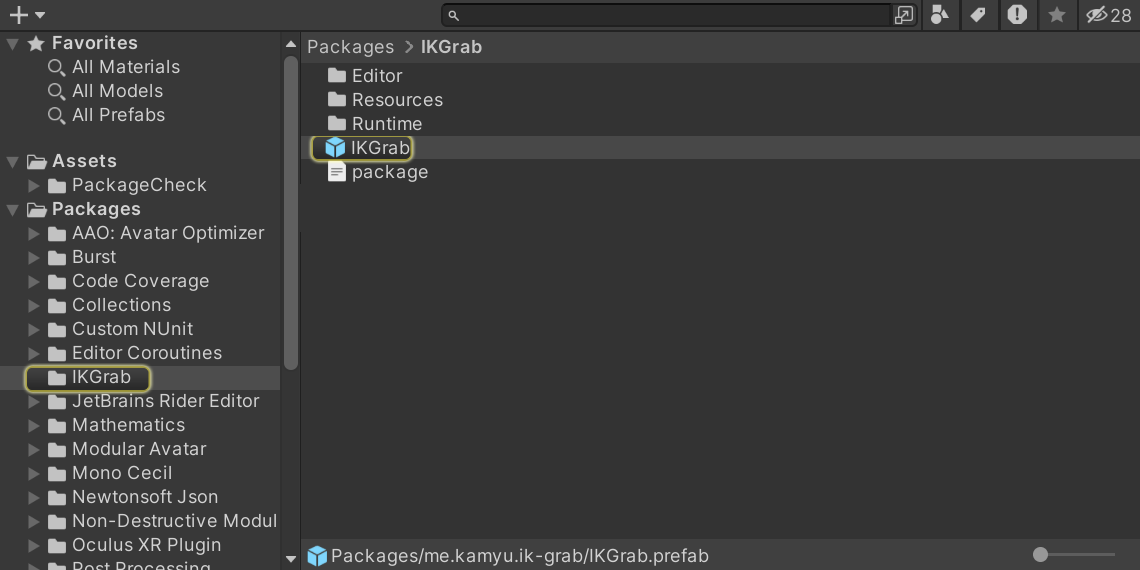
After import, the package is at Packages/me.kamyu.ik-grab.
Move from the old Assets version
Delete the Assets/kamyu_/IKGrab.NDMF folder before you import the package. The same GUIDs in two places collide.
Earlier versions installed to Assets/kamyu_/IKGrab.NDMF. The package keeps every file GUID. After you delete that folder and import the package, components and prefabs already on your avatars stay as they were. You do not need to set them up again.
Check that it installed
In the Project window, open the IKGrab package under Packages. The install worked when IKGrab.prefab is there.
Remove it
Remove the IKGrab package in the Package Manager. To remove the folder directly, delete Packages/me.kamyu.ik-grab.
IKGrab components left on the avatar show as Missing Script. Delete those components.