Quick start
-
Right-click your avatar in the Hierarchy and choose IKGrab > Add IKGrab. The menu item adds the
IKGrabprefab under the avatar's root object. GameObject > IKGrab > Add IKGrab does the same. You can also dragPackages/me.kamyu.ik-grab/IKGrab.prefabfrom the Project window under the avatar's root object. If the prefab is outside the avatar object, the inspector shows an error.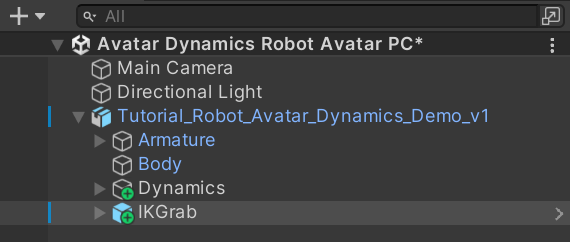
-
Select the new
IKGrabobject. -
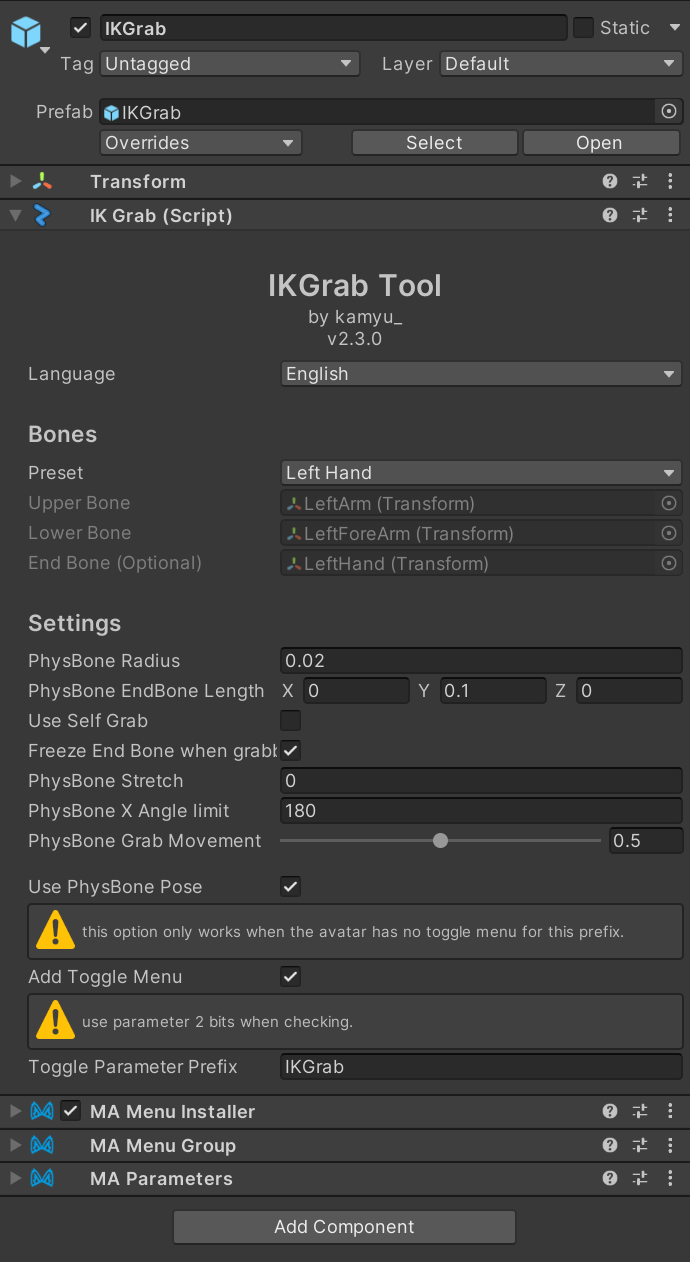
Under Bones, choose one of Left Hand, Right Hand, Left Leg, Right Leg or Head in Preset. Upper Bone, Lower Bone and End Bone (Optional) are filled in. To pick them yourself, leave Custom and drag the bones in.
-
Adjust Settings if you need to. The defaults work.
-
Build & Test the avatar or upload it. NDMF builds the grab setup during the build.
-
In game, the menu has an
IKGrabsubmenu with Grab and Pose toggles.
Adding more parts
Place one more IKGrab.prefab per part and choose a different preset. Components with the same Toggle Parameter Prefix share one menu, so Grab and Pose apply to all of them at once. To switch parts separately, give each component its own prefix.
A component added with Add Component has no menu parts, so no menu appears. Use the prefab.
If a component's bones overlap another component's, the build shows an NDMF error, and upload and Build & Test fail. See Troubleshooting.