Settings
The top of the inspector shows IKGrab Tool and the installed version. Language switches the inspector between English and Korean. The choice is stored in this PC's editor preferences.
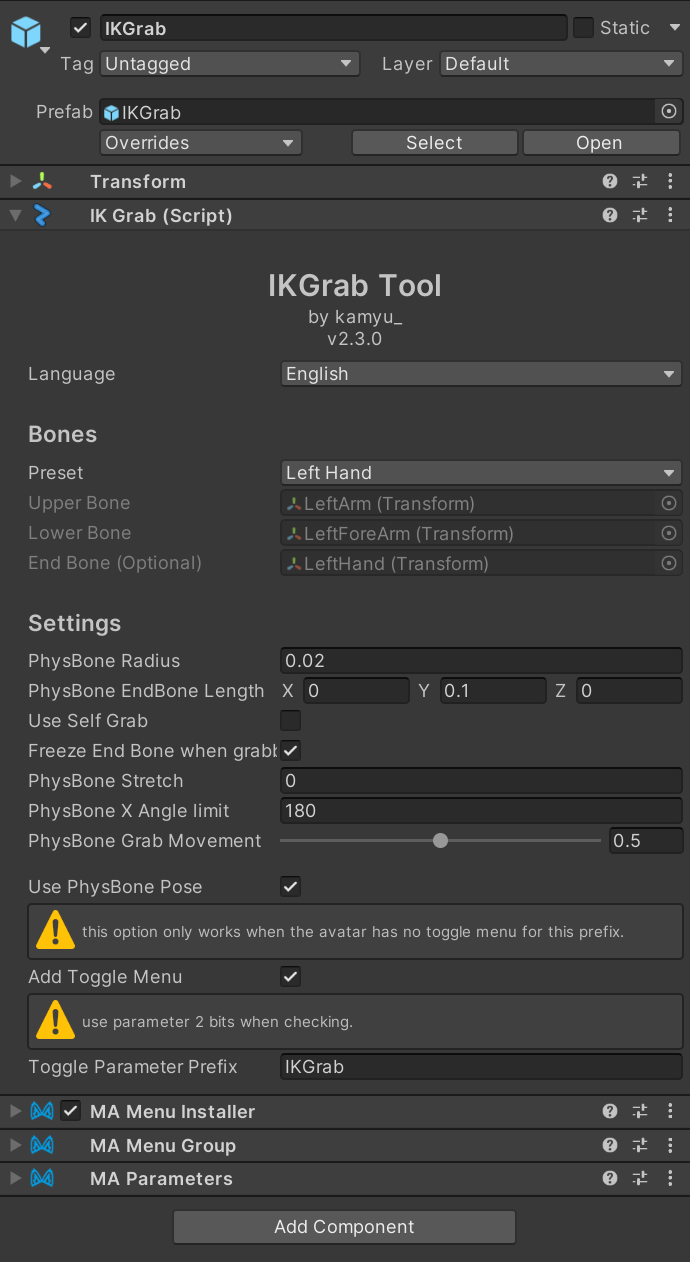
Bones
| Setting | Description |
|---|---|
| Preset | Custom, Left Hand, Right Hand, Left Leg, Right Leg, Head. Anything but Custom fills the bones from the humanoid rig and locks the bone fields. On an avatar whose Animator is not Humanoid, only Custom is offered. |
| Upper Bone | The top bone of the chain, such as the upper arm. Required. |
| Lower Bone | The middle bone of the chain, such as the lower arm. Required. |
| End Bone (Optional) | The end bone of the chain, such as the hand. May stay empty. |
Presets
| Preset | Upper Bone | Lower Bone | End Bone |
|---|---|---|---|
| Left Hand | left upper arm | left lower arm | left hand |
| Right Hand | right upper arm | right lower arm | right hand |
| Left Leg | left upper leg | left lower leg | left foot |
| Right Leg | right upper leg | right lower leg | right foot |
| Head | neck | head | none |
| Custom | picked by hand | picked by hand | picked by hand |
With Custom, picking Upper Bone puts its first child in Lower Bone and that child's first child in End Bone (Optional). A field with no such child is cleared. Change them if they are not what you want.
Bones are stored as paths from the avatar root's Animator. Only one IKGrab component can use a bone, and one component cannot set the same bone twice. End bone names must also differ between components. The comparison ignores case and characters that cannot be used in file names. If a component breaks any of these rules, the build shows an NDMF error.
Settings
| Setting | Default | Description |
|---|---|---|
| PhysBone Radius | 0.02 | The radius of the grabbable area. |
| PhysBone EndBone Length | (0, 0.1, 0) | The length of the virtual bone added after the last bone. |
| Use Self Grab | off | Lets the wearer grab it too. Other players can always grab it. |
| Freeze End Bone when grabbed | on | Keeps the end bone from following the copy's rotation while it is grabbed. |
| PhysBone Stretch | 0 | How far the part can stretch while grabbed. |
| PhysBone X Angle limit | 180 | The angle limit on the X axis. |
| PhysBone Grab Movement | 0.5 | The PhysBone grab movement value (0 to 1). |
| Use PhysBone Pose | on | Allows the part to keep its pose after it is let go. |
| Add Toggle Menu | on | Adds the Grab and Pose menu items. Uses 2 bits of avatar parameters. |
| Toggle Parameter Prefix | IKGrab | The start of the toggle parameter names. Shown only while Add Toggle Menu is on. |
Use PhysBone Pose only applies when Add Toggle Menu is off. With the menu on, the Pose item decides.
Toggle Parameter Prefix
With the menu on, the parameters <prefix>_GrabToggle and <prefix>_PoseToggle are created. An empty prefix falls back to IKGrab. Components with the same prefix share the menu of the first one. See How it works.