Troubleshooting
An avatar with no FX controller assigned
The build finishes without an error even if no controller is assigned to the FX layer under Playable Layers on the VRC Avatar Descriptor. NDMF fills the build copy with VRChat's default FX controller, and HipsGrab adds its layers and parameters there. Your own FX controller is not modified.
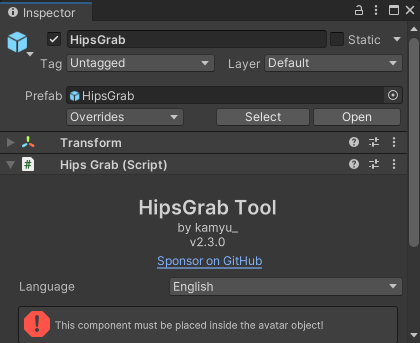
The error This component must be placed inside the avatar object!
The HipsGrab component is outside the avatar object that holds the VRC Avatar Descriptor. Move the prefab inside the avatar object. While this error shows, the inspector hides the settings.
Add HipsGrab is greyed out
Select the avatar object itself, the one that holds the VRC Avatar Descriptor. The item is greyed out when a child object is selected. An avatar that already has HipsGrab cannot get a second one.
Nothing is created
- The avatar object needs an Animator. Without it, nothing is created.
- If the avatar's Animator is not humanoid, HipsGrab is not applied. The build continues, and NDMF shows a warning (NDMF warnings). Set the avatar's rig to Humanoid.
- If the humanoid Animator cannot find the hips bone, because the hips object was renamed or removed after the rig was set up, HipsGrab is not applied. The build continues, and NDMF shows a warning (NDMF warnings).
- If the hips bone already has a Position Constraint or VRC Position Constraint, or a VRC Position Constraint on another object targets it, HipsGrab is not applied. The build continues, and NDMF shows a warning (NDMF warnings).
NDMF warnings
HipsGrab reports these warnings through NDMF. The build continues after a warning. When NDMF's language is Korean, the Korean text is shown; in any other language, the English text. The inspector shows the same descriptions as warnings before you build, in the inspector's language.
The Animator is not humanoid
- Title:
HipsGrab was not applied(HipsGrab을 적용하지 않았습니다) - Description:
The avatar's Animator is not humanoid, so there is no hips bone to attach to. Set the avatar's rig to Humanoid to use HipsGrab.(아바타의 Animator가 Humanoid가 아니라서 붙일 힙 본이 없습니다. HipsGrab을 쓰려면 아바타의 리그를 Humanoid로 설정하세요.)
The bone chain, the layers, the HipsGrab menu toggle and the HipsGrab_Toggle parameter are not added. Set the avatar's rig to Humanoid and build again.
The hips bone cannot be found
- Title:
HipsGrab was not applied(HipsGrab을 적용하지 않았습니다) - Description:
The avatar's humanoid Animator cannot find its hips bone. The hips object may have been renamed or removed after the rig was set up. Check the bone mapping in the avatar's rig settings to use HipsGrab.(아바타의 Humanoid Animator가 힙 본을 찾지 못합니다. 리그를 설정한 뒤 힙 본 오브젝트의 이름이 바뀌었거나 지워졌을 수 있습니다. HipsGrab을 쓰려면 아바타 리그 설정의 본 매핑을 확인하세요.)
The bone chain, the layers, the HipsGrab menu toggle and the HipsGrab_Toggle parameter are not added. Assign the hips bone again in the bone mapping of the avatar's rig settings and build again.
The hips bone has a constraint
- Title:
HipsGrab was not applied(HipsGrab을 적용하지 않았습니다) - Description:
The hips bone already has a Position Constraint or VRC Position Constraint, or another VRC Position Constraint targets it. HipsGrab is not applied, and your constraints are kept. Remove the conflicting constraint to use HipsGrab.(힙 본에 이미 Position Constraint 또는 VRC Position Constraint가 있거나, 다른 VRC Position Constraint가 힙 본을 대상으로 합니다. HipsGrab을 적용하지 않고 원래 컨스트레인트를 그대로 둡니다. HipsGrab을 쓰려면 해당 컨스트레인트를 지우세요.)
Your constraints are kept. The bone chain, the layers, the HipsGrab menu toggle and the HipsGrab_Toggle parameter are not added. To use HipsGrab, remove the conflicting constraint and build again.
The avatar has more than one HipsGrab
- Title:
Only the first HipsGrab was used(첫 번째 HipsGrab만 사용했습니다) - Description:
The avatar has more than one HipsGrab. The build uses only the top one in the Hierarchy and removes the others with their menu toggles. Delete the extra HipsGrab to clear this warning.(아바타에 HipsGrab이 두 개 이상 있습니다. 빌드는 Hierarchy에서 가장 위에 있는 HipsGrab만 쓰고, 나머지는 메뉴 토글과 함께 뺍니다. 이 경고를 없애려면 남는 HipsGrab을 지우세요.)
The build uses only the settings of the top HipsGrab in the Hierarchy. The menu gets one HipsGrab menu toggle. Delete the extra HipsGrab.
Other players cannot grab the hips
- If Grab Toggle is on, check that the menu toggle is on.
- Other players can always grab the PhysBone. Self Grab only decides whether you can grab your own hips.
I cannot grab my own hips
Self Grab is off. Turn it on and build again.
Write Defaults
How it works explains Write Defaults on the states HipsGrab creates. If your controller uses a different setting, check the states of the HipsGrab and HipsGrab_Toggle layers.
Where the clip files go
Clip files are saved next to the build copy, under Packages/nadena.dev.ndmf/__Generated/<avatar>/_assets/. How it works explains which clips are saved and when.