How it works
HipsGrab runs as an NDMF plugin while the avatar is built. The HipsGrab component only holds settings. It is removed from the avatar when the build finishes. The avatar in your scene is not changed.
What the build adds
The build finds the humanoid hips bone through the avatar's Animator and creates these next to it. If the Animator is not humanoid or cannot find the hips bone, or if the hips bone already has a constraint, the build creates nothing (NDMF warnings).
| Kind | Name | Content |
|---|---|---|
| Objects | HipsGrab_1, HipsGrab_2, HipsGrab_3, HipsGrab_end | A bone chain under the parent of the hips bone. HipsGrab_1 sits at the same position as the hips bone. HipsGrab_2 is Length above it. HipsGrab_3 comes down Length from HipsGrab_2 to the position of HipsGrab_1. |
| Constraints | HipsGrab_1, HipsGrab_3, the hips bone | Three VRChat Position Constraints. |
| Collider | HipsGrab_end | A Sphere Collider. |
| PhysBone | HipsGrab_1 | Its parameter is HipsGrab. Other players can grab it. Self Grab decides whether you can. |
| FX layer | HipsGrab | Switches between the states IsGrabbed = true and IsGrabbed = false. |
| FX layer | HipsGrab_Toggle | Created only when Grab Toggle is on. It turns the PhysBone on and off. |
| Clips | HipsGrab_UnGrab.anim, HipsGrab_Grab.anim | Always saved next to the build copy. Your own FX controller is not modified. Building again overwrites them. |
| Clips | HipsGrab_Toggle_ON.anim, HipsGrab_Toggle_OFF.anim | Saved next to the build copy only when Grab Toggle is on. |
The build adds the layers and parameters to the build copy that NDMF makes. If no FX controller is assigned on the avatar's VRC Avatar Descriptor, the build still finishes without an error. NDMF then fills the build copy with VRChat's default FX controller, and HipsGrab adds its layers and parameters there.
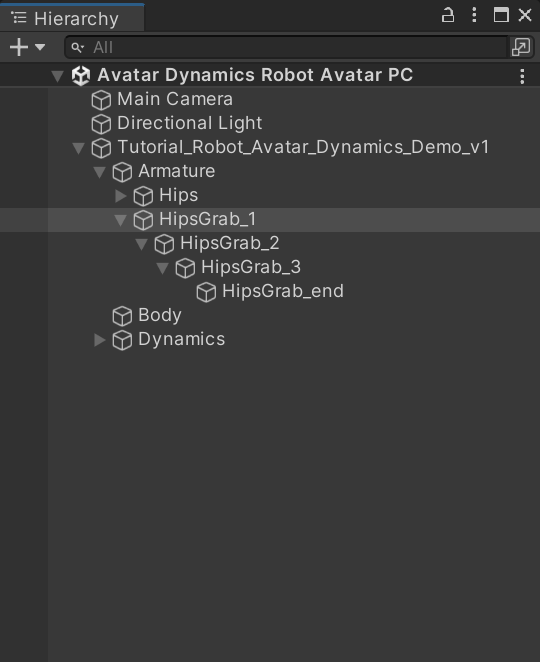
This is the built avatar. The avatar in your scene does not have these objects.
What happens while it is grabbed
VRChat provides the parameter HipsGrab_IsGrabbed, made from the PhysBone parameter HipsGrab plus _IsGrabbed. It is on while the hips are grabbed. The HipsGrab layer changes state on that value.
| State | Constraints on HipsGrab_1 and HipsGrab_3 | Constraint on the hips bone | Collider on HipsGrab_end |
|---|---|---|---|
IsGrabbed = false | On | Off | Off |
IsGrabbed = true | Off | On | On |
Parameters and cost
| Parameter | Kind | Synced |
|---|---|---|
HipsGrab_Toggle | FX parameter | In the FX controller only when Grab Toggle is on. |
HipsGrab_Toggle | Menu toggle, Expression Parameters | Bool. Synced. Saved. On by default. Uses 1 bit. Added only when Grab Toggle is on. |
HipsGrab_IsGrabbed | FX parameter | Set by the PhysBone. HipsGrab does not add it to your Expression Parameters. |
IsLocal | FX parameter | HipsGrab does not add it to your Expression Parameters. |
HipsGrab_Toggle is one synced bool, so it uses 1 bit of parameter memory. With Grab Toggle off, it uses none. If the FX controller already has a parameter with the same name, HipsGrab does not create another.
Menu
The prefab contains Modular Avatar's Menu Installer, Menu Group, Menu Item and Parameters. The Menu Item is a menu toggle named HipsGrab. Its parameter is HipsGrab_Toggle. Parameters registers that parameter as a synced bool. The value is saved. It is on by default. With Grab Toggle off, the menu toggle and parameter are not added.
Write Defaults
Write Defaults is on for the generated states if any state in the FX controller has Write Defaults on.
Avatar Optimizer
Avatar Optimizer is not required. When Avatar Optimizer is in the project, HipsGrab tells it about the HipsGrab component. Within the Optimizing phase, HipsGrab builds before Avatar Optimizer.