Quick start
-
In the Hierarchy, right-click the avatar object that holds the VRC Avatar Descriptor and choose HipsGrab > Add HipsGrab. GameObject > HipsGrab > Add HipsGrab in the top menu does the same. The prefab is put inside the avatar object and selected.
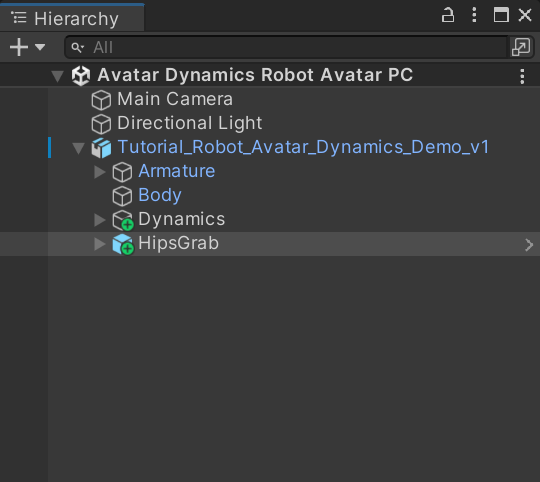
Instead of the menu, you can drag the
HipsGrabprefab from Packages > HipsGrab in the Project window onto the avatar object in the Hierarchy. The file isPackages/me.kamyu.hips-grab/HipsGrab.prefab.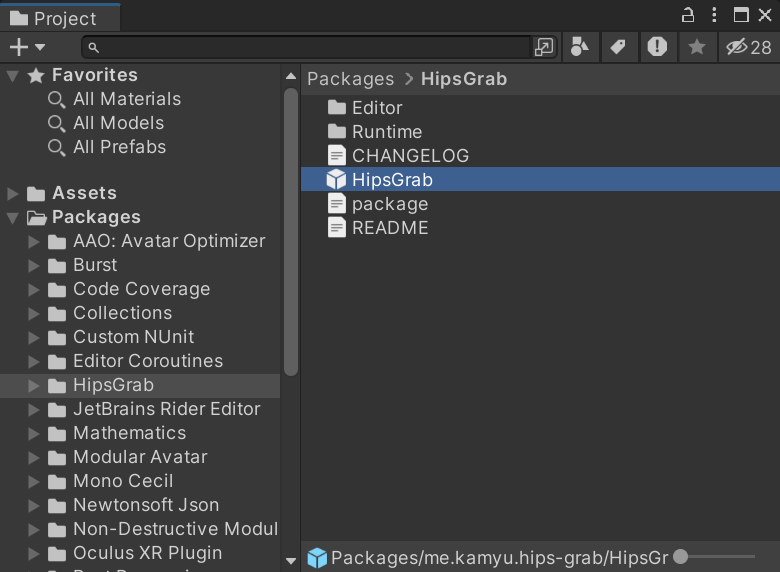
-
Select the object you just added in the Hierarchy and look at the
HipsGrabcomponent. If it is outside the avatar object, you see the errorThis component must be placed inside the avatar object!. Move it inside.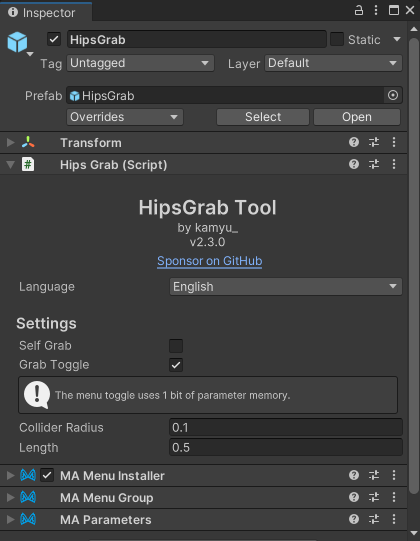
-
Adjust Self Grab, Grab Toggle, Collider Radius and Length if you need to. The defaults work as they are.
-
Upload the avatar or use Build & Test. HipsGrab is applied during the NDMF build, so nothing is added to the avatar in your scene.
With Grab Toggle on (the default), the avatar menu gets a menu toggle that turns the grab on and off. It starts on. Your choice is saved.