Settings
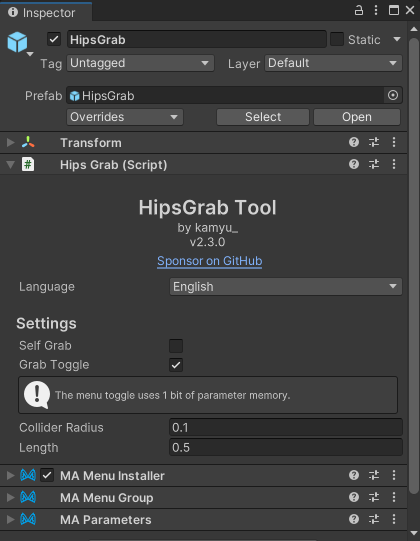
The inspector of the HipsGrab component shows four settings. Their names are in the language you choose under Language. Use only one HipsGrab per avatar. If an avatar has several, the build uses the top one in the Hierarchy and removes the others with their menu toggles (NDMF warnings). HipsGrab is applied the same way if you turn off the HipsGrab object.
| Setting | Korean name | Default | Description |
|---|---|---|---|
| Self Grab | 본인도 잡기 | Off | When on, you can grab your own hips too. When off, only other players can. |
| Grab Toggle | 메뉴 토글 추가 | On | When on, the avatar menu gets a menu toggle. The HipsGrab_Toggle layer turns the PhysBone on and off. When off, that layer, the menu toggle and the HipsGrab_Toggle parameter are not created, and the PhysBone is always on. |
| Collider Radius | PhysBone 반지름 | 0.1 | The radius of the generated PhysBone. |
| Length | 본 체인 간격 | 0.5 | Puts HipsGrab_2 above HipsGrab_1 by Length, and HipsGrab_3 below HipsGrab_2 by the same distance. |
The inspector shows the four settings under a Settings heading. Hover over a setting's name to see a short description. While Grab Toggle is on, a note says that the menu toggle uses 1 bit of parameter memory. Collider Radius does not accept a value below 0. If you enter a value below 0, it becomes 0.
Inspector warnings
The inspector shows a warning when the build would leave HipsGrab out. The warning appears when the avatar's Animator is not humanoid, when it cannot find the hips bone, when the hips bone already has a constraint, or when the avatar has more than one HipsGrab. The text is the same as the description of the NDMF warnings.
Scene view preview
When you select HipsGrab in the Hierarchy, the Scene view draws the grab area as a sphere at the hips bone. Its radius is Collider Radius. Above it, a line Length long shows the bone chain. Both values are in meters, whatever the avatar's scale. The Scene view draws nothing when the build would leave HipsGrab out.
Language
Choose English or 한국어 under Language at the top of the inspector. The inspector text and the setting names change to that language. The choice is saved in the Unity editor, so other projects use it too. Until you choose, the inspector is in Korean when NDMF's language is Korean, and in English for any other language. NDMF warnings and the FX controller dialog follow NDMF's language, not the inspector's.
Self Grab
Other players can always grab the PhysBone. Self Grab only decides whether you can too. Turn it on when you test alone or want to move your own hips.
Grab Toggle
When on, a menu toggle turns the grab on and off. The value is stored in the HipsGrab_Toggle parameter. That parameter is synced and saved. The menu toggle starts on. The parameter cost is explained in How it works.
Collider Radius and Length
Both values apply to the bone chain and PhysBone built next to the hips bone. Collider Radius becomes the PhysBone radius. Length is the spacing of the bone chain. HipsGrab_2 sits Length above HipsGrab_1, and HipsGrab_3 comes back down the same distance from HipsGrab_2 to the position of HipsGrab_1. If grabbing works well with the defaults, leave them.